Product Discovery in ChatGPT: How to List Your Products
Blog Summary
Product discovery in ChatGPT is how shoppers find, compare and shortlist products inside a ChatGPT conversation, through visual product cards, side-by-side comparisons and buyer's guides. In March 2026, OpenAI extended its Agentic Commerce Protocol (ACP) from checkout to discovery, so merchant feeds and promotions now power what shoppers see, while most purchases finish on the merchant's site. There are four routes to list products in ChatGPT: being crawled by OAI-SearchBot, submitting a direct product feed, joining through a commerce platform such as Shopify, or building a ChatGPT app. OpenAI's Product Feed Spec requires nine fields for every product, including item_id, title, description, url, brand, seller_name, image_url, availability and price. Indian brands already have working routes: crawlable product pages for everyone, plus platform partnerships such as GoKwik and PayU's multi-brand D2C experience launched in July 2026. Being listed is only eligibility; whether ChatGPT shows your product still depends on attribute-rich data, consistent prices and stock, and third-party trust.
Product discovery in ChatGPT is the process by which ChatGPT finds products that match a shopper's request and shows them as visual product cards, with images, prices, reviews and links to buy. To add products to ChatGPT Shopping, a brand needs ChatGPT to be able to read its catalogue, either by crawling its product pages or by receiving a structured product feed, and then needs data good enough for the model to pick it.
That distinction matters more since March 2026. OpenAI has moved ChatGPT shopping away from in-chat checkout and towards discovery, so the battle is now about getting into the shortlist. This guide explains how discovery works as of November 2026, the four ways to list your products, how to build a feed that passes OpenAI's spec, and what Indian D2C brands can do right now.
What Is Product Discovery in ChatGPT?
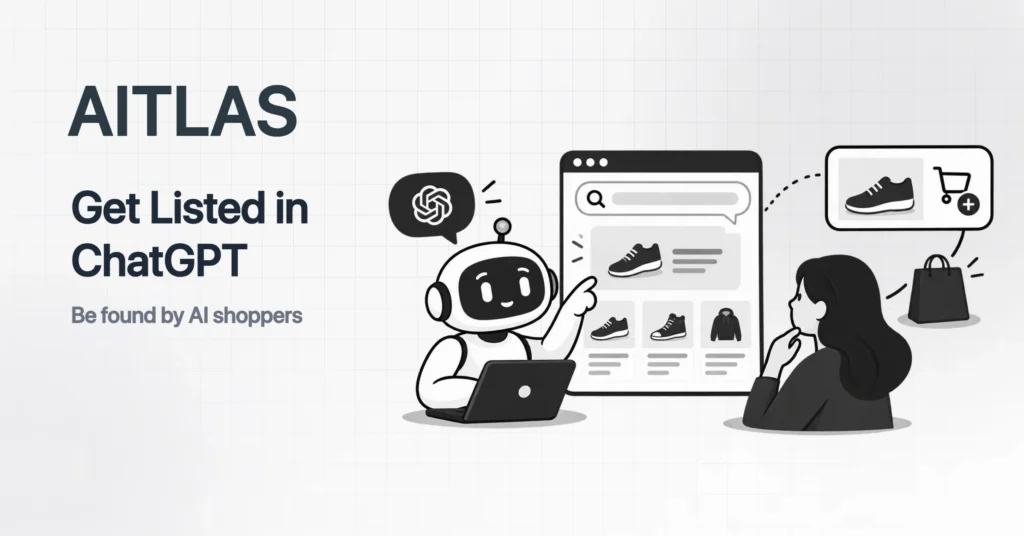
Product discovery in ChatGPT is the shopping layer of ChatGPT search: when a prompt shows buying intent, ChatGPT returns a curated set of products instead of a list of links. The shopper can then refine the list by chatting, rather than by clicking filters.
It looks different from a marketplace search. A shopper who types "a waterproof backpack for a 15-inch laptop, under Rs 3,000, for daily metro commutes" gets a handful of products with images, prices and short labels, and can then ask "which of these has a lifetime warranty?" without starting again.
According to OpenAI's announcement on powering product discovery in ChatGPT, published on 24 March 2026, the update brought more visual shopping experiences to Free, Go, Plus and Pro users. Press coverage described the core features as browsing products with images and comparing options side by side with pricing and reviews.
If you are new to how AI engines pick sources at all, start with our explainer on AI visibility and what it means for your brand. This post focuses on the product layer.
How Does Product Discovery in ChatGPT Work?
ChatGPT detects shopping intent, gathers product data from merchant feeds and the open web, matches it against the attributes in the prompt and the shopper's context, and shows the best matches as product cards. The shopper then clicks through, usually to the merchant's own site, to buy.
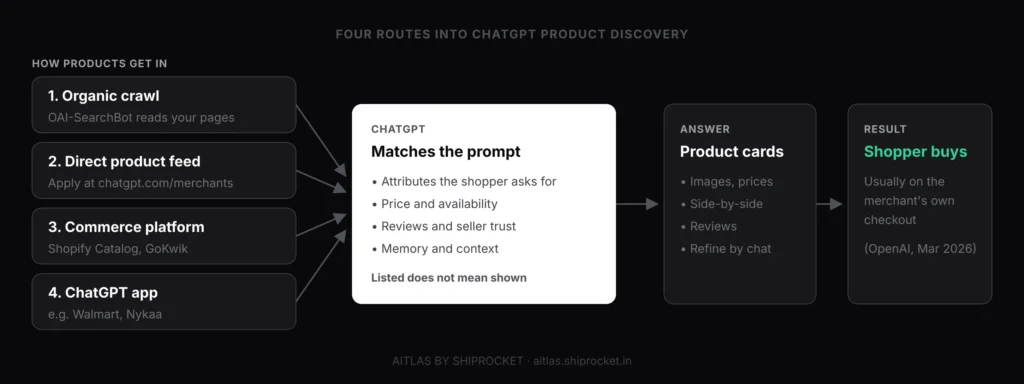
Two data sources feed this process. The first is the open web, read by OpenAI's search crawler. The second is structured data that merchants send directly, which is where the Agentic Commerce Protocol comes in.
ACP is an open standard developed by OpenAI and Stripe. It launched in September 2025 to power Instant Checkout for US users. In March 2026, OpenAI extended it to cover discovery, so merchants can share product feeds and promotions that appear in ChatGPT, and it said merchants could keep using their own checkout.
OpenAI named retailers including Target, Sephora, Nordstrom, Lowe's, Best Buy and The Home Depot as integrated for discovery. Walmart took a different path and built an app inside ChatGPT, which shows that a feed is not the only way in.
A caution on what is and isn’t published
OpenAI explains the inputs it uses, such as structured product data, third-party content and the shopper’s context, but it has not published a ranking formula for product discovery. Eligibility in a feed does not guarantee display; OpenAI’s own feed spec says so. Treat any agency promising a guaranteed slot with care.
What Are the Ways to List Products in ChatGPT?
There are four ways to list products in ChatGPT: let OAI-SearchBot crawl your product pages, submit a direct product feed to OpenAI, connect through a commerce platform that already feeds ChatGPT, or build a ChatGPT app. Most brands will use the first route plus one of the others.
| Route | How it works | Who it suits | Effort |
|---|---|---|---|
| Organic crawl | OAI-SearchBot reads your product pages and structured data | Every brand, in every market | Low: robots.txt, schema, page content |
| Direct product feed | You apply at chatgpt.com/merchants and upload a feed in OpenAI's format | Brands with clean catalogue data and a feed tool | Medium: feed build, approval, upkeep |
| Commerce platform | Your platform shares your catalogue with ChatGPT for you | Shopify stores; in India, merchants on partners such as GoKwik | Low, if your platform is already connected |
| ChatGPT app | You build an app in ChatGPT with your own catalogue and journey | Large retailers and marketplaces | High: product, engineering, partnership |
Route 1: Organic crawl
This route is open to everyone. OpenAI's crawler documentation says OAI-SearchBot is the crawler used to surface websites in ChatGPT search, and recommends allowing it in robots.txt if you want to appear. It also notes that a robots.txt change takes about 24 hours to apply.
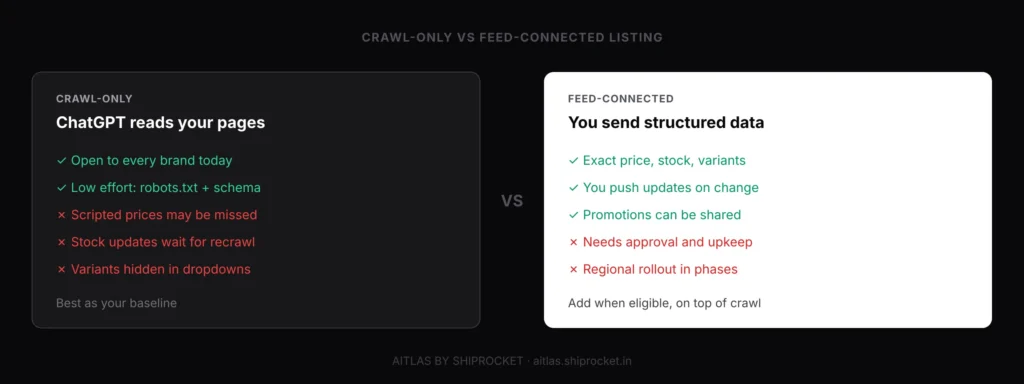
Crawling alone gives ChatGPT less certainty than a feed. Prices rendered by JavaScript, sizes hidden in dropdowns and stock that only appears at checkout are all easy for a crawler to miss.
Route 2: Direct product feed
This is the official way to add products to ChatGPT Shopping as a merchant. You apply through OpenAI's merchant page at chatgpt.com/merchants and, once approved, upload a product feed that follows the OpenAI Product Feed Spec. Third-party guides report that access opened to US merchants first and is widening in phases, so check the page for your region before you plan around it.
Route 3: Commerce platform
OpenAI's help centre says Shopify merchants' product data already reaches ChatGPT through Shopify Catalog, with no extra work for individual stores. In India, GoKwik and PayU launched what they call India's first multi-brand D2C experience inside ChatGPT in July 2026. Business Today reported that existing GoKwik merchants can make their catalogues available without extra engineering work, starting with Hyphen, Beardo and Kilrr Spices.
Route 4: ChatGPT app
A ChatGPT app gives you a branded experience inside the chat, with your own catalogue, account linking and journey. Nykaa took this path: in June 2026 it announced a multi-year partnership with OpenAI, with Nykaa Beauty and Nykaa Fashion available as apps in ChatGPT. For most D2C brands, an app is a later step, not the starting point.
Why this matters for your brand
If you sell on Nykaa or another marketplace that is connected to ChatGPT, your products may be discoverable through that partner before they are discoverable through your own site. That can send AI-driven demand to the marketplace listing rather than to your D2C store. Decide which listing you want ChatGPT to see, and make sure your own product pages are at least as complete as your marketplace ones.
How to Add Products to ChatGPT Shopping With a Product Feed
To add products to ChatGPT Shopping with a feed, apply as a merchant, map your catalogue to OpenAI's required fields, export it in a supported format, upload it, and keep prices and stock updated whenever they change. The steps below follow OpenAI's Product Feed Spec as of November 2026.
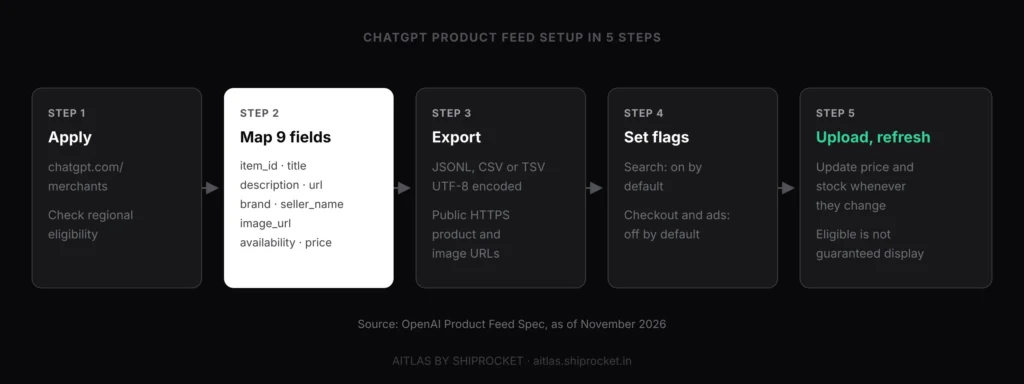
1. Apply at chatgpt.com/merchants
Submit your store details through OpenAI's merchant application to express interest in product feed integration. Direct feed access for Indian merchants is not yet confirmed as of November 2026. Prepare a structured product catalogue, a live store with clear policies, and a designated contact for integration.
2. Map your catalogue to the nine required fields
Every product row needs item_id, title, description, url, brand, seller_name, image_url, availability and price. Use stable IDs that never change between exports, and write the price as an amount plus currency code, such as 1499.00 INR.
3. Choose a supported format
The spec accepts JSONL, CSV and TSV, encoded in UTF-8. Product and image URLs must be absolute, publicly accessible links, ideally HTTPS. If you run WooCommerce, Magento or a custom stack, a feed plugin or feed management tool can generate this file for you.
4. Set the eligibility flags
The is_eligible_search flag defaults to true, so products are eligible for discovery unless you turn it off. Checkout eligibility is off by default and needs your privacy policy and terms of service. Ads eligibility is a separate flag, which keeps organic discovery and paid placement apart.
5. Upload and keep it fresh
Upload the file using OpenAI's file upload process. The spec has no fixed schedule; it asks merchants to update prices and availability whenever they change, for example when a sale starts or a size sells out. A feed that shows stock you no longer have is worse than no feed.
Here is how the required fields should look for an Indian D2C product:
| Field | What it means | Good example |
|---|---|---|
| item_id | Stable, unique product or variant ID | KRT-AURA-BLU-M |
| title | Product name with key attributes | Aura Women's Cotton Kurta Set, Straight Fit, Blue |
| description | Plain-text facts: material, fit, care, use | 100% cotton, straight fit, machine washable, for daily office wear |
| url | Live product page for that item | https://yourbrand.in/products/aura-kurta-set |
| brand | Brand name as shoppers know it | Aura |
| seller_name | The business selling the item | Aura Clothing Pvt Ltd |
| image_url | Public, high-resolution main image | https://yourbrand.in/images/aura-blue.jpg |
| availability | One of the allowed stock values | in_stock |
| price | Amount and ISO currency code | 1499.00 INR |

The availability field accepts only five values: in_stock, out_of_stock, pre_order, backorder and unknown. Map your inventory system to these exactly, because a free-text value like "few left" will not be read correctly.
How to List Products in ChatGPT Without a Feed
You can list products in ChatGPT without a feed by making your product pages easy for OAI-SearchBot to crawl and understand. This is the route most Indian brands rely on today, and it also strengthens every other route.
Start with these fixes on your best-selling products:
- Allow the crawler. Check robots.txt and your CDN or firewall rules, since bot protection often blocks AI crawlers without anyone noticing.
- Add complete Product schema. Mark up name, brand, SKU or GTIN, price in INR, availability, images, aggregate rating, shipping details and return policy, and make sure the visible page shows the same values.
- Put facts in HTML. Price, sizes, variants and stock should be in the page source, not only loaded by scripts.
- Write for prompts, not keywords. State the material, size range, use case and constraints shoppers mention, such as "for oily skin" or "for a 2BHK".
- State Indian buying details. Delivery time, COD availability, GST-inclusive pricing and return windows should be on the page in plain text.
Crawl access is a gate, not a guarantee. ChatGPT still has to trust you enough to recommend you, and that trust comes heavily from what others say. Our guide on how AI agents choose which brands to recommend explains the signals in more detail.
How Does ChatGPT Decide Which Listed Products to Show?
ChatGPT decides which products to show by matching the attributes in the prompt against the product data it holds, then weighing price, availability, reviews and seller credibility. A listed product with thin data loses to a rival whose data answers the prompt directly.
Three groups of signals do most of the work:
Data completeness
Titles, descriptions and attributes that state exactly what the shopper asked for, from fabric and size to compatibility and budget.
Data consistency
The same price, stock and delivery promise across your site, your feed, your schema and your marketplace listings.
Third-party trust
Reviews, ratings, comparison articles and community mentions that confirm your claims, so the model is confident naming you.
The shopper's context matters too. OpenAI says ChatGPT can use Memory and custom instructions when shopping, so two people asking the same question may see different products. That is why a single screenshot tells you little about your real visibility.
Third-party trust is the slowest signal to build. The formats AI engines quote most, such as comparison lists, expert reviews and forum threads, are covered in our post on how to get cited by LLMs.
Is Product Discovery in ChatGPT Available in India?
Yes, shoppers in India can already see product cards and comparisons in ChatGPT, but the merchant-side programmes are arriving in phases. That means Indian brands have fewer self-serve options than US merchants, though the gap is closing.
As of November 2026, here is where the main routes stand for an Indian brand:
| Route | Status for Indian brands |
|---|---|
| Organic crawl | Available now, wherever ChatGPT search works |
| Direct product feed | Apply at chatgpt.com/merchants and check regional eligibility |
| Shopify Catalog | Shopify stores are connected through Shopify's integration |
| GoKwik and PayU | Live since July 2026 for early brands, with more GoKwik merchants joining in phases |
| Marketplace apps | Nykaa's apps put its partner brands' products inside ChatGPT |
The demand is there. Sam Altman said in February 2026 that India has about 100 million weekly ChatGPT users, making it ChatGPT's second-largest market. Many of those users already ask for product suggestions, whether or not your catalogue is connected.
How to Check Whether Your Products Appear in ChatGPT
To check whether your products appear in ChatGPT, run a fixed set of real shopping prompts every week, record which products and brands are shown, and compare the details against your own data. Repeat the same prompts so you see a trend, not a one-off answer.
A practical audit takes four steps:
1. Build a prompt set
Write 30 to 100 prompts your buyers would actually use, grouped by category, budget and use case. Our guide to checking whether your brand shows in AI search has a quick method for getting started.
2. Log inclusion and position
For each prompt, note whether your product appears, whether it is in the first three cards, and which competitors take the other slots.
3. Check accuracy
Compare the price, specs and labels in the answer with your live page. Errors usually trace back to stale feeds, mismatched schema or an old marketplace listing.
4. Track AI referrals
In analytics, watch sessions and orders from chatgpt.com, which often arrive with a utm_source=chatgpt.com tag. This links discovery to revenue.
Open the door to OAI-SearchBot
Check robots.txt, CDN and firewall rules this week, and allow about a day for changes to apply.
Fix your top 20 product pages
Add complete Product schema, prices in HTML, and attribute-rich titles and descriptions.
Build one master feed
Map your catalogue to OpenAI’s nine required fields with stable IDs, even before you are approved.
Check your platform’s integration
Ask your store platform or checkout partner whether it already shares your catalogue with ChatGPT.
Align marketplace listings
Keep prices, stock and claims consistent between your D2C site and connected marketplaces.
Measure weekly
Track inclusion, top-3 rate, accuracy and AI referral revenue on a fixed prompt set.
See Whether ChatGPT Shows Your Products, Every Week
Getting listed is step one; knowing whether ChatGPT actually recommends you is what protects revenue. AiTLAS by Shiprocket shows how ChatGPT, Gemini, Perplexity, Google AI Overviews and AI Mode describe your brand and your competitors, so you can spot gaps before sales dip.
- RADAR monitors your brand across AI platforms every week, so you can see which shopping prompts you appear in, which you lose and who wins them.
- HYDRA publishes AEO-structured content designed to improve your citation rate on the buying questions where you are missing.
Conclusion
Product discovery in ChatGPT is now the main event in OpenAI's shopping plans. Since March 2026, merchant feeds and catalogue data decide what shoppers see, and most purchases finish on the merchant's own site.
To list your products, use every route open to you: make your pages crawlable and well marked up, prepare a feed in OpenAI's format, and check whether your platform or checkout partner already connects you. Then earn the trust that turns eligibility into recommendations.
Start with one category this week. Write 20 prompts your buyers would ask, see what ChatGPT shows, and fix the gaps you find.
You can add products to ChatGPT Shopping in two main ways: let OpenAI's crawler read your product pages, or submit a product feed. For crawling, allow OAI-SearchBot in robots.txt and add complete Product schema. For a feed, apply at chatgpt.com/merchants and upload a file that follows OpenAI's Product Feed Spec. Shopify stores are already connected through Shopify Catalog.
OpenAI says the organic product results in ChatGPT are chosen by the model and are not ads, so you don't pay for organic discovery. Your costs come from the work: building a feed, fixing product data and earning reviews. Paid placement is separate, and OpenAI's feed spec has its own ads eligibility flag that is independent of search eligibility.
OpenAI's Product Feed Spec requires nine fields for every product: item_id, title, description, url, brand, seller_name, image_url, availability and price. Prices use an amount and currency code, such as 1499.00 INR. The feed can be JSONL, CSV or TSV in UTF-8. Optional fields, such as checkout eligibility, need extra details like your privacy policy and terms.
Yes, Indian brands can appear in ChatGPT's product results today through crawlable product pages and structured data. Platform routes are also opening up, such as GoKwik and PayU's D2C experience in ChatGPT, launched in July 2026, and Nykaa's apps for brands sold there. Direct feed access depends on OpenAI's regional eligibility, so check chatgpt.com/merchants before planning a feed integration.
OpenAI says robots.txt changes for its search crawler take about 24 hours to apply. After that, ChatGPT has to recrawl your pages, and feed approval adds its own waiting time. Even once your products are eligible, appearing in answers depends on how well your data matches real prompts. Track a fixed prompt set for several weeks before judging the results.
No, listing makes your products eligible but does not guarantee they will be shown. OpenAI's feed spec says this directly. ChatGPT picks products by matching the prompt to product data, then weighs price, availability, reviews and the shopper's context. Complete, consistent data and strong third-party reviews give you the best chance.
Share this article
Newsletter
Stay ahead of AI search
Weekly insights on AI visibility, AEO strategies, and brand intelligence. No spam.

Sahil Bajaj: With 7+ years of digital marketing expertise, I'm dedicated to fusing technology and creativity for business success. Known for innovative strategies that drive growth and a passion for continuous improvement.
Related Articles