ChatGPT Business Hub: How to Claim Your Business in ChatGPT
Blog Summary
The ChatGPT Business Hub is OpenAI's beta dashboard, launched on 10 November 2026, where a business can claim its listing in ChatGPT, manage its details and see engagement insights. Businesses in ChatGPT has two parts: Business Hub for verified profiles, product feeds and insights, and Business Agents that answer shoppers' questions inside ChatGPT. To claim your business in ChatGPT, you find your listing at chatgpt.com/business-hub, verify ownership by phone, business email, website domain or Shopify, and then pass an identity check with Persona. Claiming is free, needs no Ads account or Enterprise agreement, and is open to eligible businesses wherever ChatGPT is available, but Business Agents launched only for eligible US ecommerce and online service businesses. Business Hub insights show mentions, profile views, website clicks and discovery topics, aggregated and shown only above privacy thresholds. OpenAI says claiming does not guarantee higher placement in ChatGPT answers, so a verified profile is a base layer, not a substitute for the content and third-party trust that earn recommendations.
The ChatGPT Business Hub is the place where a business claims and manages how it appears in ChatGPT. OpenAI launched it in beta on 10 November 2026 as part of a feature called Businesses in ChatGPT, which lets verified businesses correct their details, add product feeds, see how often ChatGPT mentions them and, in the US, deploy a Business Agent that chats with shoppers.
If you have ever claimed a Google Business Profile, the idea will feel familiar. The difference is that this profile feeds an AI assistant that compares, shortlists and recommends, rather than a map or a results page. This guide explains what Business Hub is as of November 2026, who can use it, how to claim your business in ChatGPT step by step, and what it will and won't do for your AI visibility.
What Is the ChatGPT Business Hub?
The ChatGPT Business Hub is a free dashboard inside ChatGPT where an owner or authorised representative claims their business listing, keeps its information accurate and views insights on how ChatGPT users find it. You open it from the ChatGPT sidebar or at chatgpt.com/business-hub.
According to OpenAI's announcement of Businesses in ChatGPT, the goal is to give businesses a new way to provide information to ChatGPT, so people exploring products and services get the most accurate and up-to-date details. OpenAI pitched it as a way to connect with the 1.2 billion people who use ChatGPT each week.
A claimed profile shows a blue checkmark, which tells users that the business has verified its ownership. Launch coverage also confirmed that OpenAI does not share users' conversations, including chats with Business Agents, with businesses.
Don't confuse Business Hub with ChatGPT Business, the paid workspace plan for teams. They share a word, but Business Hub is about how your company appears to ChatGPT users, not about how your staff use ChatGPT at work.
How Do Businesses in ChatGPT Work?
Businesses in ChatGPT works as a loop: you verify your profile and feed accurate data into Business Hub, ChatGPT uses that information alongside the open web when it answers, and you get back aggregated insights on mentions and clicks. In the US, eligible businesses can add a Business Agent on top.
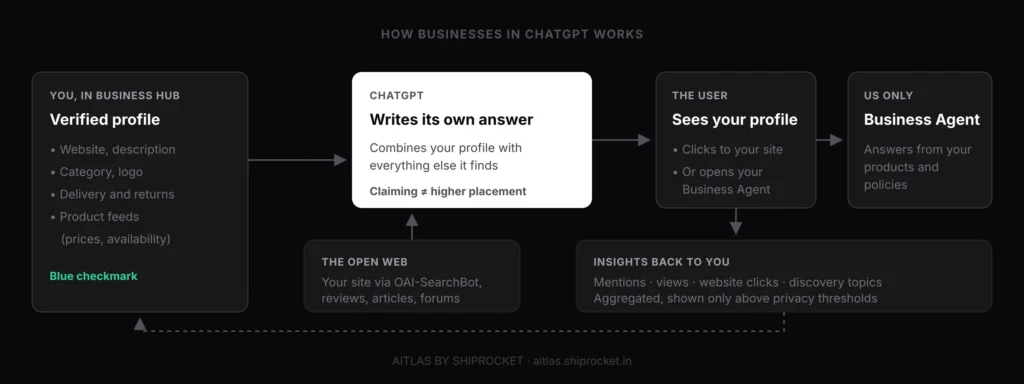
The programme has four moving parts:
- Verified profile. Your website, description, category, logo and policies, reviewed by OpenAI before changes go live.
- Product feeds. Reuters reported that verified businesses can add product feeds with pricing and availability, which ChatGPT may draw on when answering shopping prompts.
- Insights. Mentions, views, website clicks and the themes of conversations where your site is cited.
- Business Agents. An AI assistant that a shopper can open from your profile to ask follow-up questions, such as comparing two products.
Business Hub does not replace the way ChatGPT already learns about you. ChatGPT still reads your website through OpenAI's search crawler, plus reviews, articles and forums. If you want the wider picture of how those sources shape answers, read our explainer on AI visibility and what it means for your brand.
Ads sit alongside, not inside, this system. Businesses can sponsor their Business Agent and use it as the destination for ChatGPT Ads, and OpenAI says those placements are clearly labelled and kept separate from regular ChatGPT responses.
Who Can Claim a Business in ChatGPT?
You can claim a business in ChatGPT if you own it or are authorised to represent it, it is located where ChatGPT is available, and it passes OpenAI's verification and integrity checks. At launch, claiming is focused on businesses with a website.
OpenAI's help article on setting up your business on ChatGPT is clear that you don't need an Ads account or a ChatGPT Enterprise agreement to claim an eligible business. Existing Enterprise customers and advertisers can also go through their OpenAI representative.
Eligibility differs by feature, so here is the picture as of November 2026:
| Feature | Who it is open to at launch | Cost |
|---|---|---|
| Claim a business profile | Eligible businesses with a website, wherever ChatGPT is available | Free |
| Product feeds | Verified businesses; Shopify stores can connect directly | Free |
| Business Hub insights | Verified businesses, once activity passes privacy thresholds | Free |
| Business Agents | Eligible ecommerce and online service businesses in the US | Free to create; sponsorship is paid |
| Local stores and restaurants | Launch-week guides report claims only for existing US listings | Free |
Access also depends on your industry. Launch-week guides report that OpenAI may decline businesses whose offerings raise safety or integrity concerns, and may hold back some categories for now. OpenAI says it plans to expand Businesses in ChatGPT and Business Agents to more markets and business categories over time.
How to Claim Your Business in ChatGPT, Step by Step
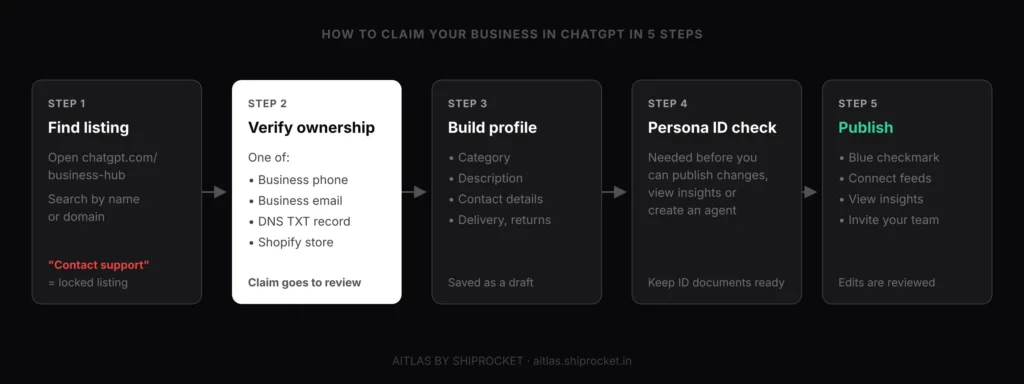
To claim your business in ChatGPT, open Business Hub, find your listing, verify that you own it with one of the offered methods, complete your profile, and pass Persona identity verification. Your profile stays a draft until both the claim and the identity check are approved.
1. Open Business Hub and find your listing
Sign in to ChatGPT with the account that will manage the business, then open Business Hub from the sidebar or go to chatgpt.com/business-hub. Search by business name or domain, select the matching listing, and confirm the account you will use to manage it. If the listing shows a "Contact support" prompt, it is locked and you need to request access from OpenAI.
2. Verify ownership
Choose one of the verification methods ChatGPT offers for your business: a code sent by text or automated call to the business phone, a code sent to the business email, a DNS TXT record on your website domain, or a Shopify connection. Only the methods that apply to your listing will appear. Search Engine Roundtable's Barry Schwartz claimed his own site using DNS, after which the claim went into a pending review.
3. Complete your profile
Launch-week walkthroughs report that you set a category, write a description, and answer questions about contact details, delivery and returns. Write the description the way you would brief a new salesperson: what you sell, who it is for, where you ship and what makes you different.
4. Pass identity verification with Persona
OpenAI's help article says you need to complete identity verification with Persona before you can publish changes to your business information, view insights or create an eligible business agent. Expect to show a government-issued ID, and possibly business registration details or proof that you are authorised to act for the company.
5. Publish, connect feeds and invite your team
Once approved, publish the profile, connect a product feed or your Shopify store, and invite colleagues or your agency with their own ChatGPT accounts. Every later change to your public details goes through OpenAI's review before it appears.
Check the details before you submit
Launch-week guides report that mismatched business details are a common reason identity checks fail, and that a published profile can’t simply be deleted later. Make sure your legal name, brand name, website and registration documents match before you start, and use a ChatGPT account tied to a company email rather than a personal one.
If someone else has already claimed your business, guides report that you can open the profile's menu and choose "Dispute ownership", which includes an identity check. Act quickly: an impostor controlling your description and policies is a real brand risk.
What Can You Edit in Your ChatGPT Business Profile?
You can edit the facts ChatGPT shows about your business: your website, description, category, logo, cover photo, contact details and your delivery and return policies. Ecommerce businesses can also add product feeds with prices and availability.
Each field answers a question shoppers already ask ChatGPT. "Does this brand ship to Pune?", "What is their return window?" and "Is this the official site?" are exactly the details an AI assistant can get wrong when it relies only on scattered web pages.
Product feeds and Shopify
Product feeds matter most for D2C brands. Launch-week guides report that Business Hub accepts CSV or JSONL feeds, and Shopify merchants can connect their stores through Business Hub or the Shopify admin. OpenAI's help documentation says eligible products from Shopify merchants already reach ChatGPT through Shopify Catalog.
Keep your feed honest and fresh. A price or stock level that doesn't match your website gives ChatGPT a reason to distrust both.
What a profile can't do
A profile can't edit what ChatGPT says in its own words. The model still writes its own answers from many sources, so a negative review thread or an outdated comparison article will keep shaping answers until you address it at the source. Our guide on why AI search recommends your competitors covers how to find and fix those sources.
What Do ChatGPT Business Hub Insights Show?
Business Hub insights show how often ChatGPT mentions your business, how many people view your profile and click through to your website, and the common themes of conversations where your site is cited. They are aggregated and appear only when there is enough activity to protect user privacy.
The metrics, as reported at launch:
| Metric | What it tells you | Watch out for |
|---|---|---|
| Mentions | How often ChatGPT names your business | Not the prompts themselves |
| Profile views | How often users open your profile | Hidden below the reporting threshold |
| Website clicks | Recorded clicks on links to your site | Not confirmed visits or sales |
| Discovery topics | Common themes where your site is cited | Themes, not individual chats |
OpenAI is careful about what a click means. The tooltip inside Business Hub reads:
“Number of recorded clicks on links to your website in ChatGPT. Clicks don’t confirm website visits or conversions.”
ChatGPT Business Hub clicks tooltip, as shown by Search Engine Roundtable, November 2026
So treat Business Hub as one data source, not the whole story. Match its click counts against sessions from chatgpt.com in your analytics, which often arrive tagged with utm_source=chatgpt.com, and against orders.
A blank metric doesn't mean zero activity. It usually means you haven't crossed the privacy threshold yet, which is common for smaller brands in the first weeks.
Business Hub also only covers ChatGPT. It won't tell you how Gemini, Perplexity or Google AI Overviews describe you, or which competitors win the prompts you lose. For that, you need a separate check, like the one in our guide to seeing whether your brand shows in AI search.
What Are Business Agents in ChatGPT?
Business Agents are AI assistants that a business creates in ChatGPT to answer shoppers' questions using its own product and policy information. A user opens your profile from a ChatGPT answer and chats with your agent, for example to compare two products or check a return policy.
At launch, Business Agents are limited to eligible ecommerce and online service businesses in the US, and verifying your business doesn't automatically make you eligible. Eligible businesses can create, test and launch an agent from Business Hub after claiming their profile.
Three things define how an agent behaves:
Your data
The agent answers from your product catalogue and policies, including prices and availability from a connected feed or Shopify store.
Your guidelines
It responds according to guidelines the business configures, so tone, scope and escalation rules are yours to set.
Clear separation
Agent chats are labelled and kept apart from the user’s main ChatGPT conversation, and the business can’t read them.
Launch-week guides report that agents can't yet complete purchases, bookings or order lookups. Their job is to help a shopper decide and take the next step on your site.
For a deeper look at how AI assistants pick which brands to put in front of shoppers in the first place, see how AI agents choose which brands to recommend.
ChatGPT Business Hub vs Google Business Profile: What's the Difference?
The ChatGPT Business Hub and Google Business Profile both let you claim and verify a listing, but they feed different surfaces. Google Business Profile powers your listing in Google Search and Maps and is built for local, in-person businesses. Business Hub shapes how ChatGPT describes your brand in conversations, and at launch it is focused on businesses with a website.
That difference in audience matters most for D2C brands. Under Google's Business Profile eligibility guidelines, a business must have a physical location customers can visit or must travel to customers. An online-only store usually doesn't qualify. Business Hub has no such requirement, so it may be the first official profile many online brands can claim.
Here is how the two compare as of November 2026:
| Feature | ChatGPT Business Hub | Google Business Profile |
|---|---|---|
| Where the listing appears | Inside ChatGPT answers and your ChatGPT business profile | Google Search, Google Maps and local results |
| Built for | Businesses with a website, especially ecommerce and online services | Businesses with a physical location or a service area |
| Online-only brands | Eligible if they pass verification | Generally not eligible |
| Cost | Free to claim; Business Agent sponsorship is paid | Free |
| Ownership verification | Business phone, business email, DNS record or Shopify connection | Phone or text, email, video recording, live video call or postcard, depending on the business |
| Identity check | Persona identity verification is required | No separate ID step for most businesses; Google may ask for more proof |
| What you control | Description, category, logo, contact details, delivery and return policies, product feeds | Address, hours, categories, photos, products, services, posts and review replies |
| Customer reviews | No review system announced at launch | Customers leave reviews and owners can reply |
| Insights | Mentions, profile views, website clicks, discovery topics | Profile views, searches, calls, website clicks, direction requests |
| Customer interaction | Business Agents answer shopper questions, US only at launch | Calls, directions and website visits; Google ended Business Profile chat in 2024 |
| Effect on ranking | OpenAI says claiming doesn't guarantee higher placement | Google ranks local results on relevance, distance and prominence |
| Availability | Beta, launched 10 November 2026 | Established product, available in India |
The two aren't rivals for your time. If you have stores or a warehouse that customers visit, keep your Google Business Profile accurate and claim your ChatGPT profile as well. Make sure your name, website, phone and policies match across both, because AI assistants read the open web too, and conflicting details give them a reason to hedge.
If you sell only online, Business Hub fills a gap Google Business Profile never covered. Your product pages, Merchant Center listings and reviews on marketplaces still do the heavy lifting in Google, while Business Hub gives you a direct line to ChatGPT.
Does Claiming Your Business Improve ChatGPT Recommendations?
No, not on its own. OpenAI says claiming a business does not guarantee higher placement in ChatGPT responses or increased sales, and ChatGPT keeps making its own recommendations.
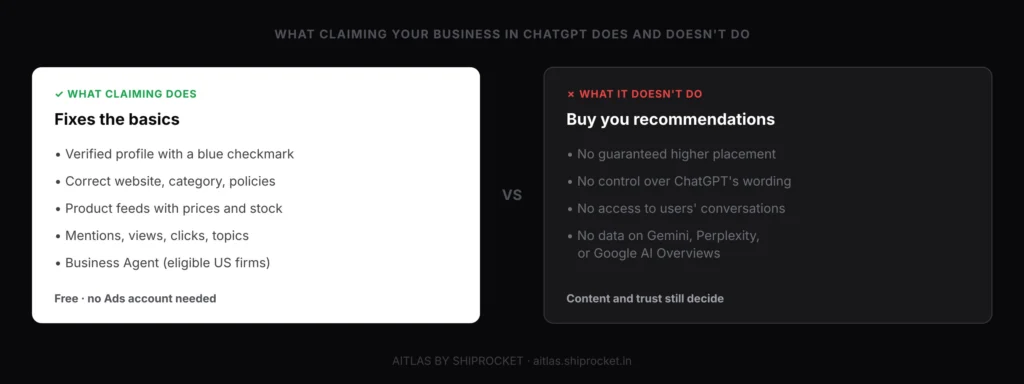
What claiming does is remove avoidable errors. ChatGPT gets accurate basics from you, rather than guessing from old pages, and you get first-party data on mentions and clicks that you didn't have before.
Whether ChatGPT picks you for "best sunscreen for oily skin under Rs 500" still depends on the same signals as before November 2026:
1. Content that answers the prompt
Pages that state the attributes shoppers ask about, in plain HTML that OAI-SearchBot can read, give ChatGPT something to match. Blocking that crawler removes your pages from ChatGPT search answers, whatever your profile says.
2. Third-party confirmation
Reviews, comparison articles, forum threads and news coverage tell the model that others trust you. Our post on how to get cited by LLMs breaks down the formats AI engines quote most.
3. Consistent facts everywhere
Your profile, website, feed and marketplace listings should agree on prices, policies and claims. Inconsistency is a reason for the model to hedge or pick a rival.
What Should Indian Brands Do About Businesses in ChatGPT Now?
Indian brands should check whether they can claim their business in ChatGPT today, prepare their details either way, and keep investing in the content and reputation that drive recommendations. Claiming is open wherever ChatGPT is available, but some coverage describes the beta as US-first, so availability for your category may vary.
Why this matters for your brand
India is one of ChatGPT’s largest markets, with around 100 million weekly users according to Sam Altman. If you don’t claim your listing, ChatGPT still describes your brand, using whatever it finds, and in the worst case someone else may try to claim it. A verified profile with correct delivery, COD and return details is cheap insurance against wrong answers.
Sam Altman's figure for India's weekly ChatGPT users came in February 2026, so the base is likely larger now. Many of those users already ask ChatGPT which brand to buy from.
Here is a practical plan for the next 30 days:
Search for your listing this week
Open chatgpt.com/business-hub, search for your brand and domain, and claim it if the option appears. Note any locked or disputed listings.
Line up your verification
Get DNS access from your web team, confirm which phone and email are listed, and keep ID and company registration documents ready for Persona.
Write your profile for shoppers
Draft a factual description plus delivery, COD and return details in plain language, and match them to your website word for word.
Prepare a clean product feed
Export your catalogue with stable IDs, prices in INR and accurate stock, or confirm your Shopify store is connected.
Check crawler access
Make sure robots.txt, your CDN and firewall allow OAI-SearchBot, so ChatGPT can read the pages your profile points to.
Set a baseline across AI engines
Track a fixed set of buying prompts every week in ChatGPT and other assistants, so you can tell whether your profile and content changes move the needle.
If you are still building the case for AI visibility internally, our comparison of AEO vs SEO explains why both channels now need a plan.
See What ChatGPT and Other AI Engines Say About Your Brand
Business Hub shows your ChatGPT mentions once you pass its thresholds. AiTLAS by Shiprocket shows how ChatGPT, Gemini, Perplexity, Google AI Overviews and AI Mode describe your brand and your competitors, on the prompts your buyers actually use, so you know where a claimed profile helps and where content still has to do the work.
- RADAR monitors your brand across AI platforms every week, showing which buying prompts you appear in, which you lose and who wins them.
- HYDRA publishes AEO-structured content designed to improve your citation rate on the questions where ChatGPT doesn’t mention you yet.
Conclusion
The ChatGPT Business Hub gives businesses, for the first time, an official way to tell ChatGPT who they are and to see how often it mentions them. Claiming is free, takes a phone, email, DNS or Shopify verification plus a Persona identity check, and adds a blue checkmark to your profile.
It is also a beta with clear limits. Business Agents launched only in the US, insights are aggregated and thresholded, and OpenAI says a claimed profile doesn't buy you better placement.
Treat it as the base layer of your ChatGPT presence. Claim your business in ChatGPT as soon as you can, keep your facts consistent everywhere, and keep earning the content and third-party trust that decide who ChatGPT actually recommends.
The ChatGPT Business Hub is OpenAI's dashboard for Businesses in ChatGPT, launched in beta on 10 November 2026. It lets a business claim its listing, verify ownership, edit its details and product feeds, and see insights such as mentions and website clicks. You open it from the ChatGPT sidebar or at chatgpt.com/business-hub. Eligible US businesses can also create a Business Agent from it.
Sign in to ChatGPT, open Business Hub, search for your business by name or domain, and select your listing. Verify ownership with one of the offered methods: business phone, business email, a DNS record on your website domain, or a Shopify connection. Then complete your profile and pass identity verification with Persona. Your profile publishes only after OpenAI approves the claim and the identity check.
Yes, claiming a business in ChatGPT is free. OpenAI's help documentation says you don't need an Ads account or a ChatGPT Enterprise agreement to claim an eligible business. Costs only come in if you choose to sponsor your Business Agent as a destination for ChatGPT Ads, which are labelled and kept separate from regular answers.
No, OpenAI says claiming a business does not guarantee higher placement in ChatGPT responses or increased sales. A claimed profile helps ChatGPT get your basic facts right and gives you insights on mentions and clicks. Whether ChatGPT recommends you still depends on your content, crawler access, reviews and third-party coverage.
Claiming is open to eligible businesses located where ChatGPT is available, which includes India, though access depends on your category and on passing verification. Business Agents launched only for eligible ecommerce and online service businesses in the US, and OpenAI plans to expand to more markets over time. Indian brands should search for their listing now and prepare their verification details.
Business Hub insights show how often ChatGPT mentions your business, profile views, recorded website clicks and discovery topics, which are the common themes of conversations where your site is cited. The data is aggregated and appears only above privacy thresholds. OpenAI does not share individual prompts or conversations, and clicks don't confirm website visits or sales.
Share this article
Newsletter
Stay ahead of AI search
Weekly insights on AI visibility, AEO strategies, and brand intelligence. No spam.

Sahil Bajaj: With 7+ years of digital marketing expertise, I'm dedicated to fusing technology and creativity for business success. Known for innovative strategies that drive growth and a passion for continuous improvement.
Related Articles